Signs Your Website Is Actually Hurting Your Google Ranking
Website Fixes
Most business owners assume a ranking problem is about not doing enough. Not enough content, not enough keywords, not enough effort. Just as often, it's the opposite: something on the technical side of the site is actively working against you, quietly, in ways that have nothing to do with how good the business is.
Key Takeaways
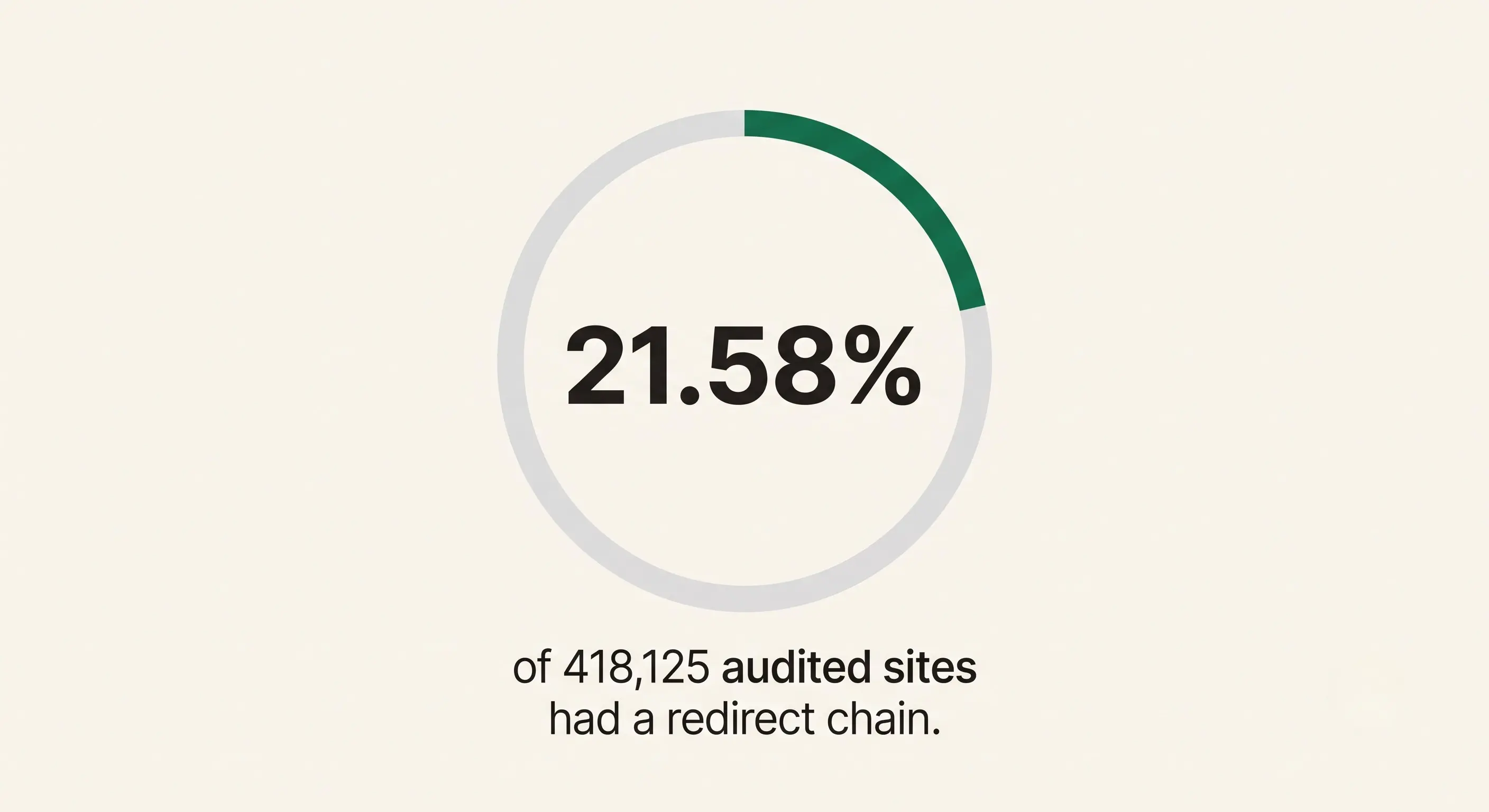
Redirect chains, one page redirecting to another, which redirects again, showed up in 21.58% of websites in a study of 418,125 site audits (SE Ranking).
53.69% of sites in the same study had duplicate meta titles across multiple pages, and roughly half had title tags that were too long or too short.
Google's own documentation confirms that broken links, redirect chains, and duplicate content all waste crawl budget. That's time Google's crawlers could otherwise spend finding your actual content (Google Search Central).
Most of these issues are invisible to a visitor. You won't notice them by looking at your own site, you have to actually check.
How Common Are These Problems, Really?
More common than most business owners assume. A study analyzing 418,125 site audits found technical SEO issues present across a large share of websites, not just a rare unlucky few (SE Ranking). These aren't exotic problems specific to huge enterprise sites. They show up just as often on small business sites, often introduced years ago during a rushed launch or a platform migration and never touched since.
The uncomfortable part: none of this is visible from the front end. You can look at your own homepage every day and never notice a redirect chain, a duplicate title tag, or a page quietly dropped from Google's index.
Old website vs. new website, a side-by-side look at what changes
Broken Links Are Wasting Your Crawl Budget
Google's own documentation is direct about this: soft 404 pages "will continue to be crawled, and waste your budget" (Google Search Central). Crawl budget is the amount of time and attention Google's crawlers give your site before moving on, and if that time gets spent hitting dead ends, it's not being spent finding and indexing your actual pages.
For a small business site with a few dozen pages, this rarely tanks rankings outright. But a site full of old, broken internal links signals exactly the kind of neglect Google's own guidance says to avoid: "If Google spends too much time crawling URLs that it shouldn't, Google's crawlers might decide that it's not worth the time to look at the rest of your site."
Redirect Chains From Old Migrations
Every time a site changes platforms, gets a URL restructure, or has pages renamed without cleanup, it risks creating a redirect chain. Page A redirects to page B, which redirects to page C, and so on. Google explicitly warns against this: "Avoid long redirect chains, which have a negative effect on crawling" (Google Search Central).
This isn't rare. 21.58% of sites in the SE Ranking study had at least one redirect chain (SE Ranking, study of 418,125 site audits).
If your site has been rebuilt, moved, or had pages renamed at any point without careful redirect cleanup, this is worth checking specifically, it's invisible to a visitor but very visible to a crawler.
Duplicate or Mismatched Meta Titles
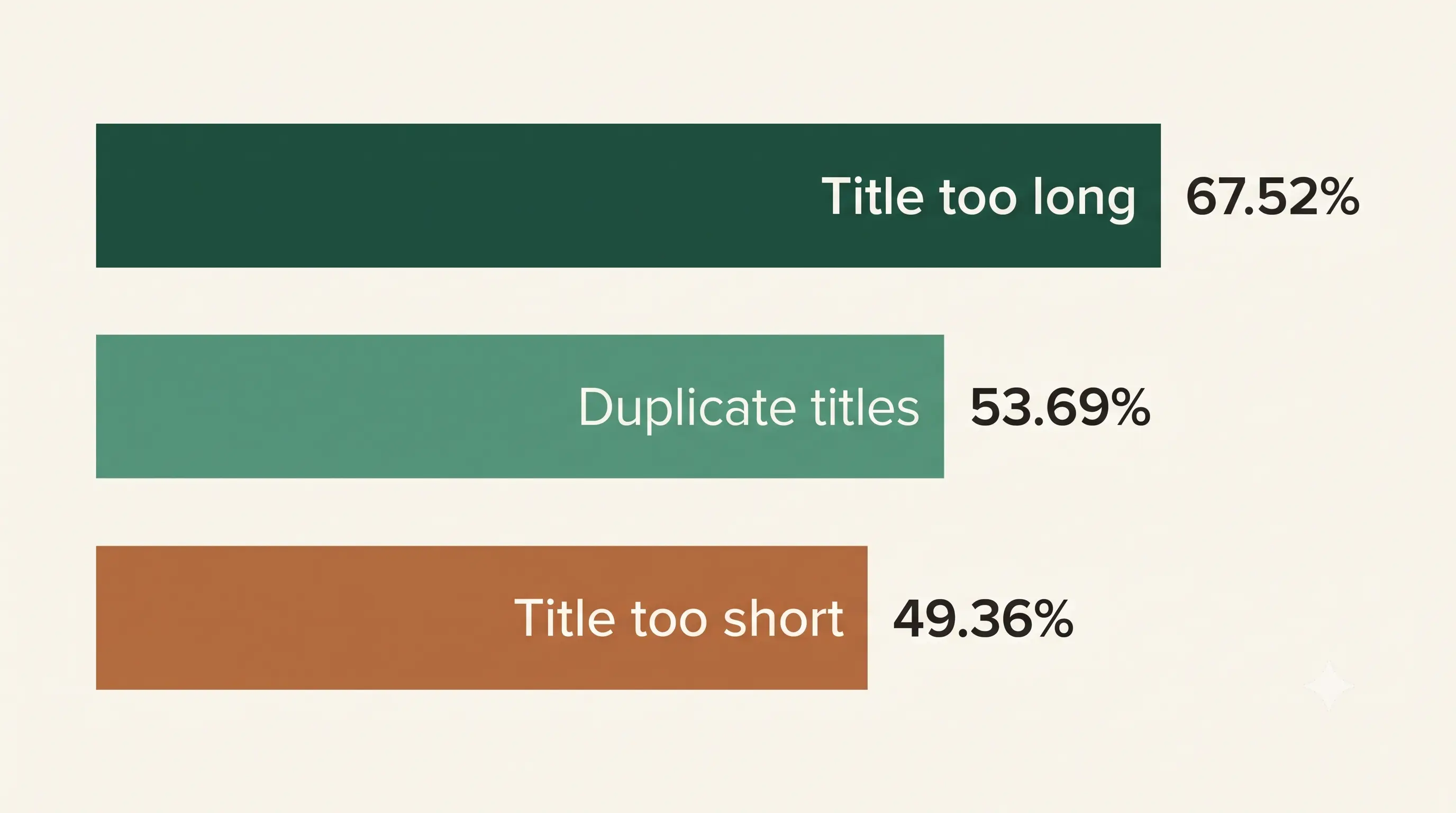
This is one of the most common issues we find when we look at a new client's site for the first time: every page technically has a title tag, but several of them are identical, or copied from a template and never customized per page. In the same SE Ranking study, 53.69% of sites had duplicate meta titles across multiple pages, and close to half had titles that were either too long (67.52%) or too short (49.36%) to display properly in search results.
None of this requires technical skill to fix. it requires actually looking at every page's title tag individually, which is exactly the step most business owners never take because their site "looks fine."
Missing Meta Descriptions and Image Alt Text
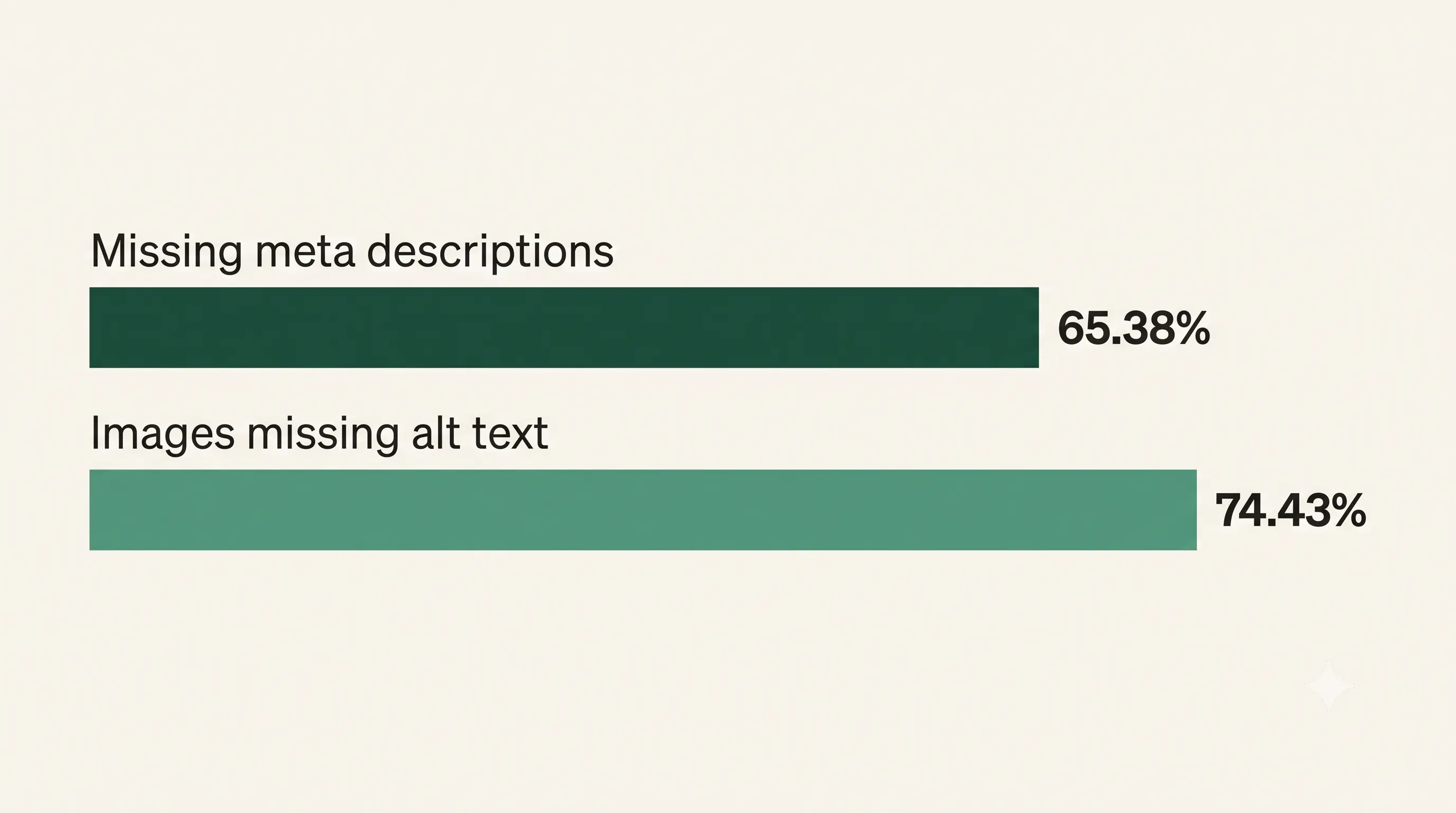
Two more issues from the same SE Ranking study of 418,125 audited sites turn up even more often than the title problems above: 65.38% of sites are missing meta descriptions on at least some pages, and 74.43% have images with no alt text at all (SE Ranking).
Neither of these directly tanks a ranking the way a technical crawl error can. But a missing meta description means Google writes its own summary for your page in search results — often an awkward, out-of-context snippet pulled from wherever on the page it landed, rather than the clear, compelling description you'd write yourself. Missing alt text means every image on your site is invisible to search engines and to visitors using screen readers, which overlaps directly with the accessibility basics covered in the audit checklist.
Free website audit checklist for Bradenton small businesses
Orphan Pages Nobody Links To
The least obvious issue in the whole list: pages that exist on your site but that nothing else on your site links to. In the same study, 69.32% of sites had at least one page with zero internal links pointing to it, and 67.11% had pages with only a single internal link (SE Ranking).
An orphan page is easy to create by accident. A service page built for a promotion that ended, an old location page left over from a menu redesign or a blog post published once and never linked from anywhere else. Google can still find these pages through a sitemap, but a page with no internal links pointing to it sends a weak signal about how important that page actually is, compared to pages your own site treats as worth linking to repeatedly.
Is Your Content Actually Being Indexed?
Here's a quick, free check: search Google for site:yourdomain.com and see what comes back. If pages you know exist aren't showing up, or the count looks far smaller than your actual number of pages, something is preventing Google from indexing them. It's often a technical issue rather than a content one.
This single check takes under a minute and catches a problem that's otherwise almost impossible to notice from the front end of your own site.
[INTERNAL-LINK: the Bradenton small business guide to getting found online → Pillar 2 hub page]
The Non-Technical Signs That Still Matter
Not every ranking issue is purely technical. Slow load times and a poor mobile experience both work against you independently of the issues above. Google has said clearly that severe performance failures actively suppress visibility, even if merely "good enough" doesn't provide a competitive boost. Both of those get a full walkthrough elsewhere:
Website speed and Bradenton customers and testing your Bradenton business site on a phone both cover the non-technical-but-still-ranking-relevant side of this.
What to Do About It
Start with the free, one-minute index check above. If something looks off, or if your site has been through a redesign, platform migration, or rebuild without careful attention to redirects and page titles, it's worth a proper technical look rather than guessing.
A reasonable order of priority, roughly matching how much each issue tends to matter: fix redirect chains and broken internal links first, since those affect crawling directly. Then work through duplicate and missing meta titles, since those affect how individual pages compete against each other. Meta descriptions and alt text matter too, but they're lower-urgency. Worth fixing, not worth losing sleep over.
None of this requires touching your site's design or rebuilding anything. It's a maintenance pass, not a redesign, which is exactly why it's easy to put off indefinitely unless something prompts you to actually check.
Free website audit checklist for Bradenton small businesses
Frequently Asked Questions
Do broken links directly lower my Google ranking?
Not directly. Google has stated 404 errors on their own don't penalize the rest of your site. The real cost is indirect: wasted crawl budget and a signal of poor maintenance, both of which can affect how thoroughly your site gets crawled and indexed (Google Search Central).
How do I know if my site has redirect chains?
The clearest sign is a site that's been rebuilt, migrated, or restructured at some point without careful redirect cleanup. A technical site audit tool can identify them directly; short of that, testing your oldest, most-linked pages for how many redirect hops they take is a reasonable manual check.
Is duplicate content something I need to worry about?
It's less than most people assume. Google has confirmed duplicate content doesn't trigger a penalty on its own. Duplicate meta titles are a different, more common issue worth fixing, since they affect how your individual pages compete against each other in search results.
What's the fastest way to check if Google has indexed my pages?
Search site:yourdomain.com in Google and compare the results to how many pages you actually have. A significant gap is worth investigating further.
Does missing alt text on images actually affect my ranking?
Not directly, but it compounds. 74.43% of sites have at least some images missing alt text (SE Ranking), and beyond the accessibility impact, it means those images carry zero information to search engines about what they show. It's a small, cumulative gap rather than a single dramatic problem.
The Bottom Line
A site can look completely fine to you and still be quietly working against itself behind the scenes. None of the issues here require a full rebuild to fix. They require someone actually checking, which is the step almost every business skips until something prompts them to look.
Not sure if your own site has any of these issues? [CTA: Get a free, no-pressure website check — real answers on a real phone call, not an automated quote
Stay Inspired
Get fresh design insights, articles, and resources delivered straight to your inbox.