Should You DIY Your Website or Hire a Pro?
Choosing A Designer
Seventy-five percent of consumers judge a company's credibility by its website design, and they form that opinion in about 50 milliseconds (Sweor). That's faster than you can finish reading this sentence.
If you're a Bradenton business owner trying to decide between a $20-a-month builder and a custom site that costs thousands, you're not just picking a tool. You're picking how fast, and how well, your business gets judged by every person who finds it.
Most comparisons of DIY builders versus professional designers are written for a national audience with no stake in whether you show up in a Manatee County search or an Anna Maria Island tourist's phone during peak season. This one is. We'll walk through real costs, real timelines, and the specific moments when DIY stops being the smart choice for a local business.
Key Takeaways
DIY builders cost $0-$30/month but take 10-40 hours to learn well (DesignPowers, 2026).
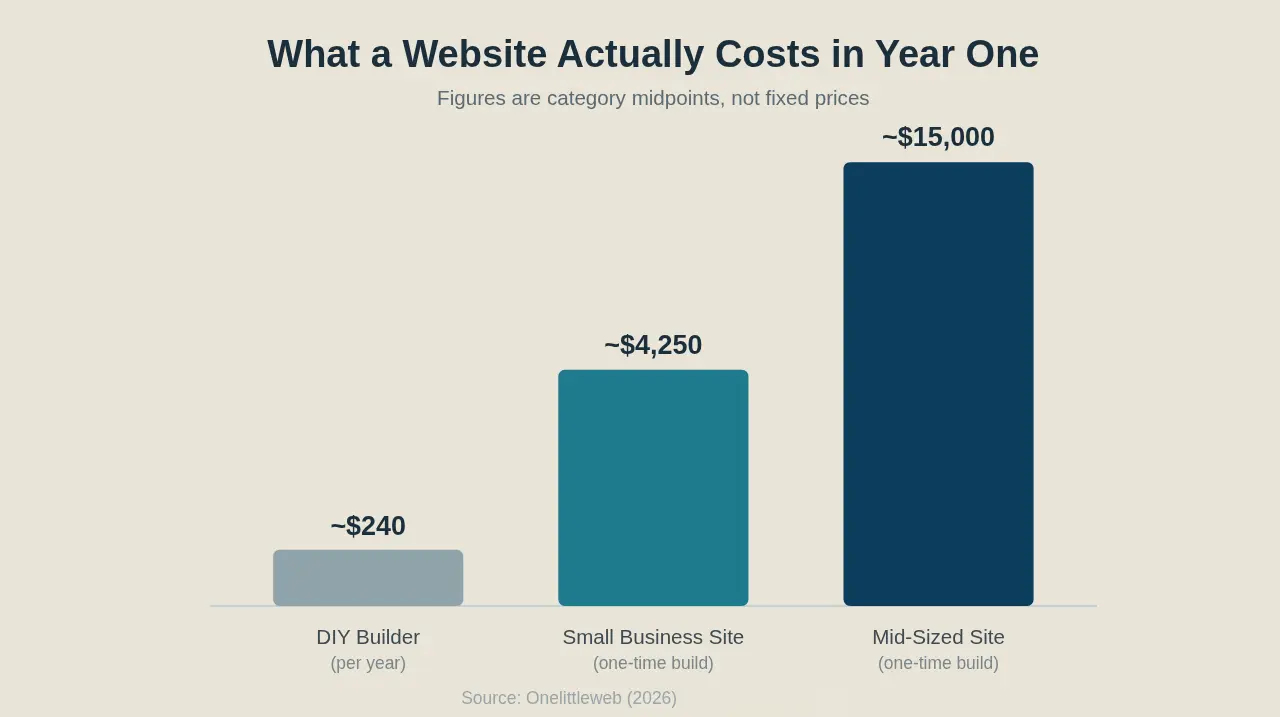
A small business website typically costs $500-$8,000 to build, and mid-sized business sites run $5,000-$25,000 (Onelittleweb, 2026).
75% of consumers judge your credibility by your website design in about 50 milliseconds (Sweor).
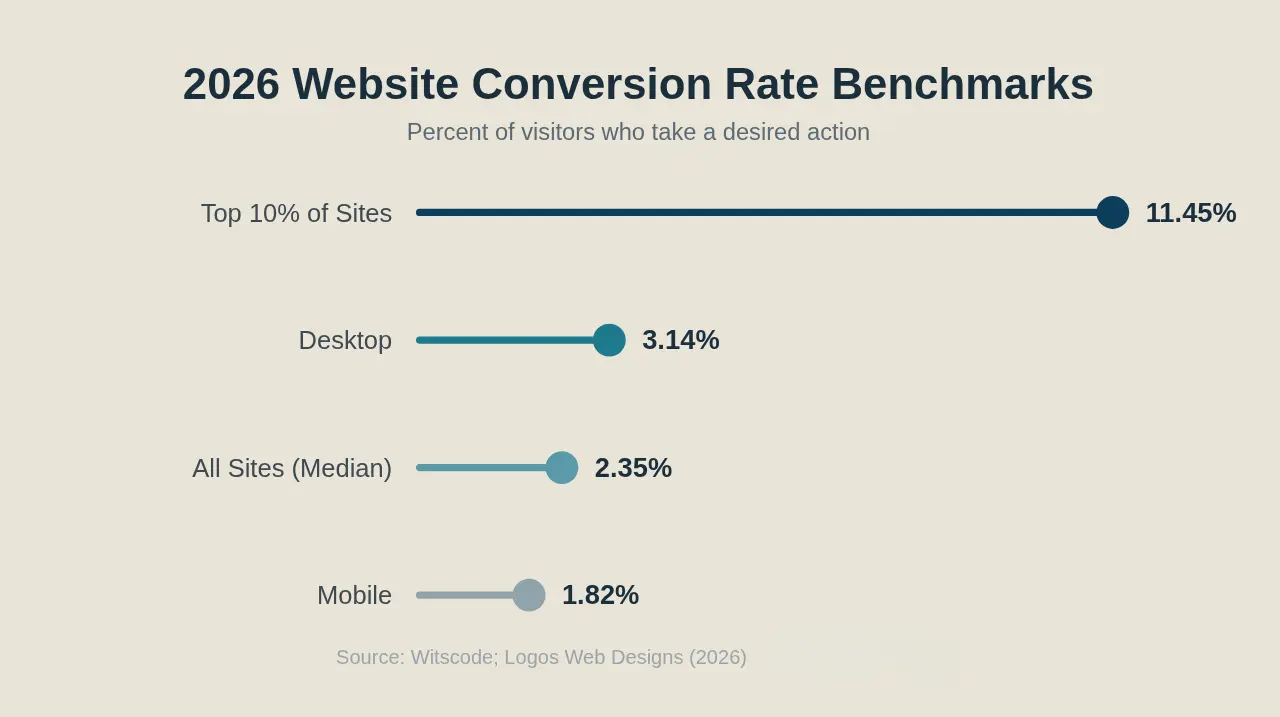
The 2026 median site converts at 2.35%, while the top 10% convert at 11.45% (Witscode, 2026).
What's the Real Difference Between DIY and Hiring a Pro?
DIY builders trade money for your time; hiring a pro trades money for a strategist's judgment. Website builders collectively power roughly 10% of all websites, excluding WordPress and Shopify, with Wix alone at 4.3% (Colorlib, 2026). Proof of how many business owners start here first, not because it's the best long-term option, but because it's the fastest way to get something live.
A DIY builder gives you a template, a drag-and-drop editor, and a monthly bill. You pick the layout, write the copy, and troubleshoot whatever breaks. Hiring a pro gets you a discovery conversation, a custom design built around how your specific customers search and buy, and someone else on the hook when something goes wrong. Neither is "better" in the abstract. They solve different problems.
Here's what most comparisons miss: the DIY-vs-pro decision isn't really about design taste. It's about whether your website needs to actively sell for you or just exist. A digital business card doesn't need a strategist. A lead-generation engine does. Which one is yours?
For a deeper look at what separates a functioning site from one that's quietly losing you customers, see 7 Signs Your Bradenton Business Website Needs a Rebuild.
How Much Does Each Option Actually Cost?
A DIY builder runs $0-$30 a month, while a custom small business website typically costs $500-$8,000 to build, and a mid-sized business site runs $5,000-$25,000 (Onelittleweb, 2026). The sticker price is the easy part to compare. What each option costs you beyond the invoice is the part most owners never budget for.
DIY hides its real cost in your calendar, not your bank account. Every app, plugin, and stock-photo add-on chips away at that "$20 a month" promise, and none of that counts the hours you'll spend fighting the platform instead of running your business. A professional build is the opposite: the number is bigger upfront, but it's bounded. You know what you're getting and when.
Maintenance matters too. Most DIY plans bundle basic hosting and updates into the subscription, while a custom site usually carries a separate monthly support line item. Isn't it worth knowing which bill you're actually signing up for before you commit a year of Saturdays to a "quick" website project?
How Long Does Each Approach Take to Launch?
A DIY site can go live in a matter of days, but learning to build one well, the platform, formatting content, and troubleshooting layout and technical issues, takes 10-40 hours before you even reach ongoing updates (DesignPowers, 2026). That's most of a work week, spread across evenings and weekends, on top of running your business.
A structured project with a designer moves differently. You're not hunting for the right template at 11 p.m.; you're answering questions in a discovery call, reviewing drafts, and approving a launch date. The clock runs on someone else's schedule, not yours. For a business owner already stretched thin, that difference alone can be the deciding factor. How many evenings this month can you actually spare?
Will a DIY Site Actually Convert Local Customers?
Most DIY sites underperform on conversion, and the data backs that up: the 2026 median website conversion rate is 2.35%, while the top 10% of sites convert at 11.45% (Witscode, 2026). Roughly 70% of small business websites don't even have a proper call-to-action on their homepage (Tenet, 2026).
A site can look perfectly fine and still fail at its actual job. Templates are built to look good in a demo, not to guide a specific visitor toward calling you, booking you, or filling out your form. That gap between "looks fine" and "converts" is exactly where a strategist earns their fee. Structuring the page around what your customer needs to do next, not just what looks tidy.
When rebuilding a DIY site for a local client, the fix is rarely a redesign for design's sake. It's almost always the same handful of things: a buried contact form, a homepage with no clear next step, or a mobile layout that makes people give up before they find the phone number.
What About Local SEO and Google Business Profile?
DIY builders often limit the technical SEO controls that matter most for local pack rankings, and that gap shows up fastest on mobile. 40% of visitors abandon a site that takes more than three seconds to load (Tenet, 2026). For a Bradenton business competing in Manatee County search results, that's a meaningful share of visitors who never even see your page.

This matters even more if your business leans on seasonal traffic. Anna Maria Island businesses that depend on tourist-season visitors need a site that loads fast and ranks locally the moment demand spikes, not one still fighting a template's default page structure. For the mechanics of how that ranking actually works, read How Local SEO Works for Manatee County Small Businesses.
Builders aren't incapable of good SEO. But most owners don't have 10-40 extra hours to learn the platform and the SEO on top of it, so something usually gets skipped. It's rarely obvious which piece was skipped until rankings stall.
When DIY Makes Sense (and When It Doesn't)
DIY fits a low-stakes "digital business card" site; a professional build fits any business that depends on its website for leads, bookings, or revenue. Thirty-eight percent of users stop engaging with a site if the layout or content is unattractive (Sweor, 2026), which matters a lot more if that visitor was about to become a paying customer.

Ask yourself three questions. Does your website need to generate leads, or just confirm you exist? Do you have 10-40 hours to spend learning a platform this year? And if the site went down or looked broken for a week, would it actually cost you money? If you answered "generate leads," "no," and "yes," a DIY builder is probably working against you, not for you.
The Hybrid Path: Start DIY, Upgrade Later
Plenty of owners start on a DIY builder to get online fast, then move to a custom build once the business depends on the site for real revenue. And the data shows why: 73% of small businesses had a website in 2023, up from about 50% in 2018, largely because DIY tools lowered the barrier to getting online at all (MarketingLTB, 2026).
If you're on that path, protect what already works before you migrate. Carry over your existing content, preserve any SEO equity you've built, and make sure every phone number, email, and contact form still routes correctly after launch. A good migration should feel invisible to your customers. To see what ongoing support looks like once a new site is live, check out What Happens After Your Website Launches?
Frequently Asked Questions
Is it worth hiring a web designer instead of using Wix or Squarespace?
It depends on how much your website needs to sell for you. The 2026 median conversion rate is 2.35%, but the top 10% of sites hit 11.45% (Witscode, 2026). That's a gap usually driven by strategy a template can't provide on its own.
How much does a professional website cost for a small business?
A small business website typically costs $500-$8,000 to build, while a mid-sized business site runs $5,000-$25,000 depending on complexity (Onelittleweb, 2026).
Can a DIY website hurt my local SEO?
Yes, indirectly. DIY platforms often limit technical SEO controls, and 40% of visitors abandon a site that loads slower than three seconds (Tenet, 2026). Both factors that hurt local pack rankings in competitive markets like Manatee County.
When should I upgrade from a DIY site to a custom build?
Upgrade when your website needs to actively generate leads, bookings, or revenue rather than just confirm you exist. If you don't have 10-40 hours to invest in learning a DIY platform properly, that's usually a sign it's time to hand the project to someone else.
The Bottom Line
Cost isn't just the number on the invoice. It's the hours you'll spend, the customers you'll convert, and the local searches you'll win or lose. DIY builders make sense for low-stakes sites with no real revenue riding on them. A custom build makes sense the moment your website has real work to do.
DIY: cheap upfront, expensive in time and missed conversions
Pro: bigger investment, bounded cost, built to actually convert
Hybrid: start DIY, migrate once the business depends on the site
If you're not sure which category your business falls into, tell us a little about your business and we'll talk it through on a real phone call, no pressure, no jargon.
Stay Inspired
Get fresh design insights, articles, and resources delivered straight to your inbox.